Showing posts with label TIPS. Show all posts

Friday, May 1, 2015

Type in many languages with Input Tools in Gmail

Input Tools makes it easy to type in languages like Arabic, Chinese, or Hindi. There are different types of input tools for different languages.

Set up Input Tools

  1. Open Gmail.
  2. Click the gear in the top right.
  3. Select Settings.
  4. In the Language section at the top of the "General" tab, click Show all language options and check the box for Enable input tools.
  5. In the “Input Tools" window that appears, double-click the input tool you'd like from the "All input tools" field, and it'll move to the "Selected input tools" field.
    • You can reorder your input tools by selecting one of your input tools and clicking the up and down arrows.
    • The keyboard icon indicates that you’ve selected a virtual keyboard.
  6. Click OK.
  7. Click Save Changes at the bottom of the page.
OPEN GMAIL SETTINGS
You can edit these selections at any time by returning to your settings and clicking Edit tools in the “Language” section.

How to use Input Tools

Once you’ve enabled an Input Tool, you can turn it on and off using the button next to the gear icon in the upper right corner of Gmail.

Input Tools button
If you've enabled multiple Input Tools, you can click the down-arrow menu to switch between them.
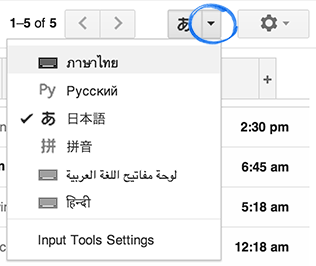
Input tool option


Types of Input Tools


  • Handwriting input: Write words directly with your mouse or trackpad.
  • Transliteration: Type languages phonetically in English letters, and they'll appear in their correct alphabet. Keep in mind that transliteration is different from translation; the sound of the words is converted from one alphabet to the other, not the meaning.
  • Input Method Editor (IME): Use a Latin alphabet keyboard to convert your keystrokes to Asian characters. We offer a handful of IMEs like Pinyin and Wubi IMEs for Simplified Chinese, as well as Pinyin and Zhuyin/Bopomofo IMEs for Traditional Chinese and Japanese.
  • Virtual Keyboard: Use an on-screen keyboard native to languages like Arabic, Hebrew, Thai and Korean.

COURTESY:https://support.google.com/mail/answer/139576?hl=en

Thursday, December 5, 2013

India Post Browser 1.0 Android Application.


This app is developed for India Post customers and users to help them to access all day to day links and websites on their Android powered smart phones and tablets.

This application is developed by Shri. Deepak Langhi, SA, Mumbai Region. Any suggestions to improve this application are welcome.

CLICK HERE TO DOWNLOAD .


courtesy:sapost.

Friday, November 29, 2013

How To Disable the Automatic Restart on System Failure in Windows 7


Windows 7 is configured by default to restart immediately after a Blue Screen of Death (BSOD) or other major system problem. This reboot usually happens too fast to see the error message on screen.
Follow these simple steps to disable the automatic restart feature for system failures in Windows 7.
Important: Unable to boot completely into Windows 7 due to the BSOD? See Tip #2 at the bottom of this page for help.
Difficulty: Easy
Time Required: Disabling the Automatic Restart option in Windows 7 usually takes less than 10 minutes

Here's How:

  1. Click on the Start button and then on Control Panel.
    Tip: In a hurry? Type system in the search box after clicking Start. Choose System under the Control Panel heading in the list of results and then skip to Step 4.
  2. Click on the System and Security link.
    Note: If you're viewing the Small icons or Large icons view of Control Panel, you won't see this link. Simply double-click on the System icon and proceed to Step 4.
  3. Click on the System link.
  4. In the task pane on the left, click the Advanced system settings link.
  5. Locate the Startup and Recovery section near the bottom of the window and click on the Settings button.
  6. In the Startup and Recovery window, locate and uncheck the check box next to Automatically restart.
  7. Click OK in the Startup and Recovery window.
  8. Click OK in the System Properties window.
  9. You can now close the System window.
  10. From now on, when a problem causes a BSOD or another major error that halts the system, Windows 7 will not force a reboot. You'll have to reboot manually when an error appears.


    BSOD (Blue Screen of Death)

    Definition: Abbreviated as BSOD or BSoD, the Blue Screen of Death is the popularized name for what is technically called a STOP message or STOP error. It's the blue, full screen error that often displays after a serious system crash. The text on the Blue Screen of Death may list any files involved in the crash including any drivers that may have been at fault and often a short, usually cryptic, description of what to do about the problem.


    courtesy:http://pcsupport.about.com

Wednesday, October 9, 2013

Remove Write Protection On Memory Card Or USB Pen Drive .


education and technology Remove Write Protection On Memory Card Or USB Pen Drive Or iPod


You may see the following errors when your pendrive,memory card becomes write protected

Cannot copy files and folders, drive is write protected

Cannot format the drive, drive is write protected

The disk is write protected

Remove write protection or use another disk

Media is write protected


You cant formate your write protected drives either and pendrives,memory card,ipod etc could become write protected suudenly the possible reason is malware or virus attack.Remember the problem lies in your personal computer but hopefully it is very easy to remove the write protection.Let's see how to fox the insufferable problem

INSTRUCTION

1.Open Start Menu >> Run, type regedit and press Enter, this will open the registry editor.

2.Navigate to the following path:


HKEY_LOCAL_MACHINE > SYSTEM > CurrentControlSet > Control > StorageDevicePolicies

If the registry key StorageDevicePolicies key does not exist, you will need to create it

Download this batch file called add.bat from HERE and double click after download the key will be automatically added to registry.


education and technology Remove Write Protection On Memory Card Or USB Pen Drive Or iPod


3.Double click the key WriteProtect in the right pane and set the value to 0 in the Value Data Box and press OK button


education and technology Remove Write Protection On Memory Card Or USB Pen Drive Or iPod


4.Exit Registry, restart your computer and then again re-connect your USB pen drive on your computer. That is it, done.


courtesy:http://allbloggingtrickz.blogspot.in

Wednesday, September 25, 2013

SRFIX-Weblink Release Date - 24.09.13 -

DB Analyzer updation made easy.

Added Feature: 
Downloading DB Analyzer made simple. Just click on menu Download DB Analyzer. The zip file will be downloaded and files will be extracted to DBA default path automatically. If default path not available, then the Directory will be created.  Shortcut will be placed on Desktop and  DBA will run to confirm the updation.

Tuesday, September 24, 2013

CEPT - Official Web Site


Center for Excellence in Postal Technology (CEPT), the IT center of the Department of Posts  has hosted its official web site at http://cept.gov.in.   
You need to be a registered  user to access this site.

Free Photo-Editing Software ( No Registration is required) : iPiccy.com


iPiccy.com a free completely Web-based photo editing and sharing application to give users everywhere the ability to quickly and easily edit, enhance, share and print all of their photos from any Internet browser.

iPiccy provides new, easy-to-use tools for modifying pictures, using advanced image processing. iPiccy offers the easiest user interface and workflow of any photo editing application, allowing users to easily pull images from any Web site or file folder. iPiccy includes an extensive variety of easy Web-based photo-editing tools such as Auto-fix, Rotate, Crop, Resize and Color adjustment and Sharpen - all in one place and in real-time. In addition, iPiccy can also be used to turn photos into creative masterpieces, with clever special effects like Liquify, painter, vignette, pencils, and many more. iPiccy.com works flawlessly in any Web browser and is compatible with Mac, Windows and Linux. And since iPiccy lives on the Web, it is constantly evolving as new image-editing technology is developed and the needs of the user base change. 

Thursday, June 13, 2013

Laptop Not Charging or Booting Causes.


This is one of the more common issues I come across on a day to day basis and there are many reasons that the laptop may not be charging the battery. We are going to look at the top 5 reasons.

Note that some of these solutions involve dismantling your laptop. If you are not comfortable working on your laptop you are best to take it to a repair technician.

1. Faulty/Dead Battery
Most laptops are designed to run on AC power only (the power adapter) but there are a few laptops out there that will not run without a battery. If your battery is completely dead then it may be that the laptop is not detecting a battery as present. The solution would be to try another battery to see if it resolves the issue.

2. Laptop boots but then battery is not charging

This is quite a common occurrence. I have found in my experience this tends to be more an issue with dell and HP computers but it is also found on other models. You may find that when you have the computer running that the battery is not charging. This can be caused by 3 things.

Friday, May 31, 2013

Detention of Post Parcel by Customs in India


1.      Post Parcel has been detained by Customs since the value of the contents exceeds permissible limit of Rs.2000/-. The dutiable articles, intended for personal use, imported by post or air, are restricted subject to value limit of Rs.2000/-(CIF), as per the conditions laid down under the CTH 9804 under the clause 3(1)(i) of Foreign Trade (Exemption from application of Rules in certain cases) order, 1993. In view of the above restriction the goods having value more than Rs.2000/-(CIF) become restricted for import and the same are liable for confiscation under Section 111 (d) of the Customs Act, 1962 and the Importer is liable for penalty under Section 112(a)(i) of the Customs Act, 1962.


Monday, May 27, 2013

How to tackle Laptop Over Heating problem.


  Overheating can cause the laptop to show abnormal behaviour thereby causing the internal machinery to fail. Follow the following procedure to avoid it.
1. Compressed Air: While working with laptop in dusty condition then there are chances that the dust gets deposited on the circulating and cooling vents thereby choking them altogether. This can cause the fan to get over worked as the head will not be dissipated as efficiently. Thus the fan will work at dangerously high temperatures. So in order to avoid this situation buy a can of compressed air from a nearby computer store and it will cost you only some dollars. Take this can and spray it on the vents of your laptop. This will remove all the dust and keep your laptop cool.

Thursday, May 23, 2013

Estimating Appliance and Home Electronic Energy Use


Formula for Estimating Energy Consumption

Use this formula to estimate an appliance's energy use:

(Wattage × Hours Used Per Day) ÷ 1000 = Daily Kilowatt-hour (kWh) consumption

1 kilowatt (kW) = 1,000 Watts

Multiply this by the number of days you use the appliance during the year for the annual consumption in kWh per year.

Friday, May 17, 2013

What are NEFT and RTGS?


National Electronic Fund Transfer (NEFT) and Real Time Gross Settlement (RTGS) allow individuals, companies and firms to transfer funds from one bank to another. You can check the RBI website for a list of NEFT and RTGS-enabled branches of your bank. These facilities can only be used for transferring money within the country. To opt for these, you need to fill a form providing your or the beneficiary’s details — name, bank branch where the account is held, the Indian Financial System Code, a unique code for identifying the branch, and the account number and type. You have to submit a cheque while opting for this facility. You can also transfer funds through net banking. These are third-party transfers and the option is available under the same header on your net banking home page.

Friday, May 3, 2013

Computer keeps restarting without warning


Your clients or even your own computer may keep restarting for no reason without warning. 
First of all, when a computer keeps rebooting it can be caused by a wide range of problems,
 from incompatable software such as Firewalls and Antivirus software, damaged or overheating
 parts inside your computer or even incompatable peripherals such as printers and scanners.
 Here are some computer repair tips to help you diagnose the problem.When a reboot occurs
 from within Windows XP, your computer will totally restart without telling you what caused it.
 This is the default behavior when Windows XP encounters a system failure.

Tuesday, January 29, 2013

TUBULAR BATTERY- MAINTENANCE TIPS.


Battery maintenance is very important when we use Home inverters. Generally Tubular batteries are recommended due to its high efficiency and life span. Various makes and types are of batteries are available in the market. . Tubular batteries are recommended to backup UPS and Inverters where environmental conditions are tough and ambient temperatures are common. These are capable of long hours of backup and the life period is around five years.

Battery is the backbone of the inverter. Maintenance free batteries come in Flat plate collectors and are totally maintenance free. These batteries have a typical life of 4 years if properly charged and maintained.


Wednesday, January 23, 2013

Standard operating Procedures:


   The standard operating Procedures of eMO,IFS MO,eVPP, MNREGS, NPS and COD are attached here with as many of the viewers asked for it

MNREGS                         https://www.box.com/files/0/f/0/1/f_5701887198

e-MO                               https://www.box.com/files/0/f/0/1/f_5701884060

iFS                                    https://www.box.com/files/0/f/0/1/f_5701911594

NPS                                 https://www.box.com/files/0/f/0/1/f_5701897562

Speed Post-COD             https://www.box.com/files/0/f/0/1/f_5701922766

eVPP                               https://www.box.com/files/0/f/0/1/f_5701899742


courtesy:satirur

Monday, July 23, 2012

Microsoft reveals 2013 Office Suite


Microsoft unwrapped the next edition of its Office money maker at a press event and simultaneously launched a public preview for users to try out now.The Preview is Available in the following Link Start here.To get your hands on the customer preview of Office 2013, all you need to have is your Windows Live ID.Office 2013 will work only in Windows 7 and Higher version

Friday, July 20, 2012

HOW TO FIX INTERNET EXPLORER PROBLEMS IN WINDOWS XP,WINDOWS VISTA AND WINDOWS 7


DOWNLOAD THE FIX IT TOOL FOR INTERNET EXPLORER


http://support.microsoft.com/mats/ie_performance_and_safety/

Fix Internet Explorer issues to make IE fast, safe and stable
 Diagnose and repair ie problems that make ie slow, not secure, unstable or crash, caused by add-ons not working or inappropriate security settings. Find other automated solutions
 What it fixes...

HOW CAN I IDENTIFY A FORGED CURRENCY NOTE


1)      What is a forged note?

A suspected forged note, counterfeit note or fake note is any note which
does not possess the characteristics of genuine Indian currency notes.
2)       How can I identify a forged note?

You can identify a forged note if you are unable to detect the features which are present in
a genuine Indian currency note. These features are easily identifiable by seeing, touching and tilting the note.